Forget the sterile, silent cubicle. The modern developer’s workspace is a curated experience. Enter vibe coding tools—a philosophy that prioritizes developer well-being, flow state, and environmental aesthetics to boost productivity and joy. It’s not just about writing code; it’s about crafting the perfect atmosphere in which to create. And a new wave of tools is here to help you build that vibe.
What is Vibe Coding?
Vibe coding moves beyond pure functionality. It’s the intentional setup of your digital and physical workspace to minimize friction, inspire creativity, and make long coding sessions enjoyable. It combines visual customization, ambient stimulation, smart automation, and a focus on developer ergonomics.
Think of it as your “developer experience stack.” The right tools can transform your screen from a mere tool into a personalized command center that feels good to work in.
Key Elements of a Vibe Coding Setup:
-
Visual Aesthetics: Pleasing color schemes and interfaces.
-
Ambient Audio: Focus-enhancing soundscapes.
-
Flow Automation: Tools that remove repetitive tasks.
-
Ergonomic Feedback: Immediate, satisfying responses to your actions.
Essential Vibe Coding Tool Categories
To build your ultimate setup, explore these key categories of tools.
1. Terminal & Editor Aesthetics: Your Digital Canvas
Your code editor and terminal are where you spend most of your time. Making them visually pleasing is step one.
-
Warp: A modern, Rust-based terminal that rethinks the experience. It has a built-in command palette, intuitive block editing, and extensive theming. It feels fluid and intelligent, drastically cutting down CLI friction.
-
Oh My Zsh & Starship: Supercharge your shell. Oh My Zsh provides hundreds of themes and plugins for Zsh. Starship is a minimal, blazing-fast prompt that shows contextual info (git status, runtime versions) in a sleek format.
-
VS Code Theme Marketplace: Don’t settle for default. Dive into vast collections like One Dark Pro, GitHub Theme, or SynthWave ’84 for that perfect glow. Extensions like GlassIt-VSC can even add translucency.
-
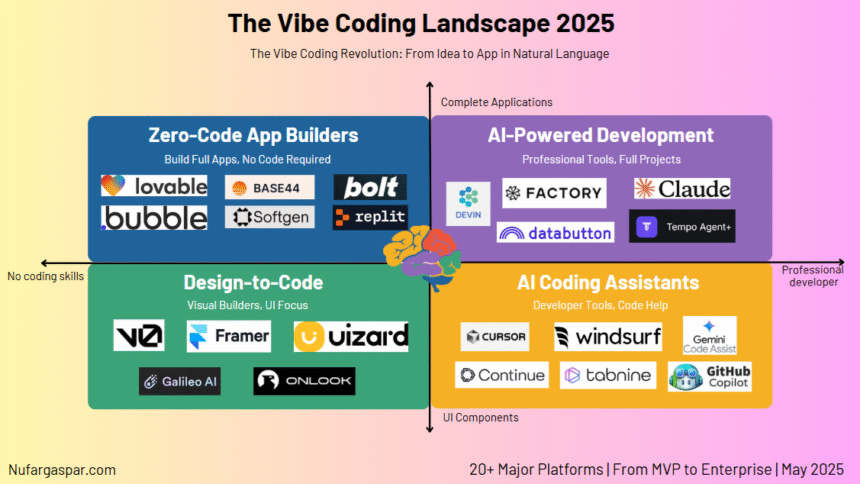
Cursor or Zed: Newer, performance-focused editors that emphasize workflow and aesthetics. They often come with beautiful defaults and are built for the vibe-coder from the ground up.
2. Ambient Sound & Focus Tools: Craft Your Soundscape
The right audio backdrop is proven to deepen concentration and block distractions.
-
brain.fm: Science-backed audio sessions designed to enhance focus, relaxation, or sleep. Its “focus” modes are a favorite for getting into the flow.
-
Endel: Creates personalized soundscapes in real-time based on your input (time of day, weather, heart rate). Its “Focus” algorithm adapts to help you maintain flow.
-
Noizio: A simple mixer for ambient sounds—rain, coffee shop chatter, crackling fireplace, white noise. Blend your perfect atmosphere.
-
Lo-Fi Girl YouTube Stream: The iconic, ever-running livestream of chill beats. It’s a community staple for a reason.
3. Automation & Flow Enhancers: Code with Less Friction
Remove tedious steps and let the machine handle the boilerplate. This is where vibe meets pure productivity.
-
Windsurf or Cursor (with AI): These AI-powered editors integrate GPT-4/Copilot-like features directly into your editing flow. They suggest code, explain errors, and even refactor in natural language, keeping you in the zone.
-
Raycast or Alfred: Replace your OS spotlight search. These app launchers do far more: calculate, manage snippets, control music, search docs—all with keyboard shortcuts. They’re the ultimate flow-state guardians.
-
GitHub Copilot: More than an autocompleter, it’s a pair programmer that reduces context-switching. Let it generate boilerplate, tests, or even entire functions based on your comments.
4. Visual Feedback & Fun: Add a Little Delight
Small, satisfying feedback makes interaction enjoyable.
-
Command Palette Animations: Many modern tools (like Warp, VS Code with plugins) add smooth animations to commands, making your workflow feel fluid.
-
Pomello or Flowtastic: Visually appealing Pomodoro timers that gamify focus sessions with attractive stats and gentle notifications.
-
Raindrop.io or Start.me: Create a visually stunning, organized dashboard for your bookmarks and daily start pages. A beautiful home tab sets the tone.
How to Build Your Vibe Coding Stack: A Practical Guide
Getting started is easier than you think. Follow this simple roadmap.
Step 1: Audit Your Friction Points
What constantly breaks your flow? Is it a clunky terminal, a dull editor, or outside noise? Identify one or two key pain points.
Step 2: Start with the Core – Your Editor & Terminal
Choose one visual upgrade. Install a new terminal (try Warp) or finally spend an hour picking the perfect editor theme and font pairing (Fira Code is a popular, ligatured choice).
Step 3: Introduce Ambient Sound
Experiment with a free tool like Noizio or a YouTube stream during your next work session. Notice if it helps you ignore distractions.
Step 4: Automate One Repetitive Task
Use Raycast/Alfred to create a quick link to your current project folder. Or let GitHub Copilot write a simple function you do often.
Step 5: Iterate and Personalize
Your vibe is personal. Add or remove tools as your preferences change. The goal is sustained comfort and focus.
Conclusion
Vibe coding is often misunderstood as just making things “pretty.” In reality, it’s a holistic approach to sustainable productivity. By reducing cognitive load, minimizing distractions, and creating an environment you want to be in, you invest in your long-term creativity and well-being as a developer.